Posts

The Final Countdown - An RP3250 based Event Timer

Image
Sometimes, we are counting down the days to an important event, such as a trip or an anniversary. A few years ago, I built a timer for this, using an ESP-8266 board and two LED bar displays: It worked fine, but powering it through the USB connector was a bit of a pain. So, I started thinking about a battery-powered device. Looking at my parts stash, I found a few components that could be used in this project: An e-paper display: it shows the last image even if powered down. A tinyRTC module, with a DS1307 with battery backup and an AT24C32 EEProm: it can save the event date and keep track of the current date and time. A XIAO RP2350 board: it has support for a rechargeable battery. I had enough experience with the first two modules, the XIAO RP2350 brought the adventure of learning about power saving with the RP2350.

RP2350 Boards

Image
Over the past few months, I have collected a few boards that utilize the RP2350 microcontroller. In this post, I will provide a brief description of each one. 1:RP2350USB, 2:RP2350 Stamp XL, 3:RP2350-GEEK, 4:RP2350 Stamp, 5:RP2350 Zero, 6:XIAO RP2350, 7:Feather RP2350, 8:Raspberry Pi Pico 2, 9:RP2350B Core Board, 10:Raspberry Pi Pico 2 W

Building a One-time Password Token

Image
One-time passwords are an alternative to the more common "permanent" passwords. The problem with a "normal" password is that it can be captured during communication, by fake login screens or by key-loggers.  Once a normal password is captured, it can be used until it is changed. To avoid this "repetition attack", one-time passwords work just once. For each login, a new password is used. This creates a new problem: how to set up these passwords? One solution is to have a "password book", but that is very clumsy. In this post, we will see how to build a device that generates one-time passwords, one at a time. The other side can use the same algorithm to check the passwords. We will use a Raspberry Pi Pico W board with a MicroPython application. WARNING: This is a demo only. The encrypting key will be in plain text in the code, open to any curious eyes. Do not use this with any real key!

Mini-Review: Solder Party's RP2350 boards

Image
Solder Party is a Swedish company that has some peculiar boards. For the RP2350 (and RP2040), they have stamp boards, which contain the microcontroller, and carrier boards, where the stamps are connected and provide power and input/output connectors. One detail that will bother many people is that the pin spacing on the stamp boards is 2 mm instead of the more traditional 0.1" (2.54 mm). SolderParty sells connectors with this spacing. Although some carriers have RP2040 in their names, all models work with RP2040 and RP2350 stamps. I purchased both stamp models with RP2350 and the three carrier models. Here are some comments on them. The RP2350 Stamp XL installed into the RP2xxx Stamp Carrier XL

Using an RP2040 to Load Programs from a SD Card into a ZX81 Microcomputer

Image
This was a fun project, putting together my old and new hobbies. Back in the 80s, cheap personal computers used K7 tape to store programs. I still got a few of these old computers, but tape is pretty rare these days and my K7 players are breaking apart. You can find a lot of ZX81 software in the internet, as files for emulators. How about using an RP2040 to generate the necessary audio signals from these files? The final assembly

I2C Pico USB Adapter: Part 4 - Usage

Image
In this last part, I will show a few ways to use the adapter under Linux and Windows. Accessing an I2C device with Python, under Windows

I2C Pico USB Adapter: Part 3 - I2C

Image
I expected implementing the I2C communication would be very easy. After all, the RP microcontrollers have hardware for this and the SDK has support for it. Alas, I did not take into account some limitations of the hardware and the way i2c-tiny-usb implements its commands.

I2C Pico USB Adapter: Part 2 - USB Communication

Image
The USB standard is complex. Even having studied it hard for my book on the RP2040, I admit I was sometimes confused. This particular application involves some functions of the tinyusb library that are not much discussed in the documentation. USB Control Transfers, Taken from Figure 8-37 of the USB 2.0 specifications

Halloween with MicroPython

Image
This is a quick Halloween project (if you have the parts, they are easy to find).  With a little imagination, you can adapt it to different components or behaviors. The software is written in MicroPython for a RP2040 (or RP2350), you can port it to other boards by replacing the PIO code for the HC-SR04 sensor with normal GPIO operations. A resin skull (bought in a trinket store) is transformed into a spooked object that lights up and makes strange noises, especially when someone nears it.

I2C Pico USB Adapter: Part 1 - Introduction

Image
In this series of posts I will describe my latest project: an I2C to USB adapter that can be constructed with an RP2040 or RP2350 board. The adapter using a XIAO RP2040 connected to a PCF8583 RTC+RAM

I found a crazy bug in the unofficial Arduino support for the RP2040 v 4.01!

This is a strange tale... I've been using  the excellent  Raspberry Pi Pico Arduino Core , managed by Earle F.  Philhower III, from its beginnings. It has been recently updated to support the new Pico2 and RP2350. As part of my preparations for testing the new Pico2 (received it yesterday), I was playing with some old microcontroller benchmarks. When I tried a Whetstone benchmark in the old Pico the program just stopped somewhere in the middle of the calculations, and here starts the tale. double X; // declared here so the multiplication is not removed by optimization void setup() { pinMode(LED_BUILTIN, OUTPUT); digitalWrite(LED_BUILTIN, LOW); double T = millis(); X = -1.3 * T; digitalWrite(LED_BUILTIN, HIGH); } void loop() { delay(100); } This code forces the bug!

Some Fun with CircuitPython

Image
CircuitPython Day 2024 will be next Friday (Agoust 16), so here is a simple project! I am using a few modules I got in my drawers: An RP2040 Feather board. This is a nice RP2040 board with 8 MB of Flash and a battery charger (not used in this project). A BMP390 sensor. I chose this particular board because it has a  STEMMA QT connector, just like the Feather board. A 128x64 pixels OLED display, with I2C interface. A 4 by 4 WS2812 RGB LED matrix. This project aims to use the sensor to measure temperature, air pressure, and altitude, show this information in the OLED display and set the RGB LEDs to a color based on the temperature.

The New Raspberry Pi Pico 2, RP2350 and RP2354: a Short Recap

Image
On August 8th, Raspberry announced a new version of the Pi Pico board, the Pi Pico 2, along with a new microcontroller, the RP2350 / RP2354. In this post I will tell the highlights of these new products, along with my comments.

Mini Review: RP2040 Pi Zero

Image
It is common to see confusion between the Raspberry Pi Pico and other Raspberry Pi boards. The RP2040 Pi Zero, from Waveshare, makes it even more confusing, putting an RP2040 microcontroller in a Pi Zero form factor (including a mini HDMI connector).

Using the LCD 12864-06D Display with the Raspberry Pi Pico

Image
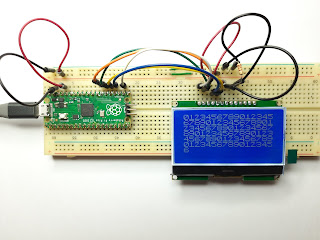
The LCD 12864-06D is a graphic (128 by 64 pixels) monochrome Liquid Crystal Display. You will find it in AliExpress and many other stores, but information on it is scarce. An intriguing point is that ads mention that it is graphic and has a Chinese font. In this post I will present the information I have gathered and share some sample code (using the unofficial RP2040 support for Arduino by  Earle F. Phillhoower III).

Using a Pi Pico to Test DS18B20 Temperature Sensors

Image
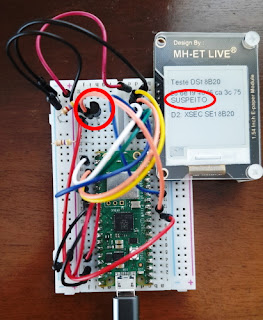
 The DS18B20 is an easily found temperature sensor, both the sensor itself (it looks like a transistor) and as a waterproof probe with the sensor inside a metallic case. What many don't know is that a large part of the sensors sold are not original parts and many have serious defects.

Using WiFi in the Raspberry Pi Pico (Part 5)

Image
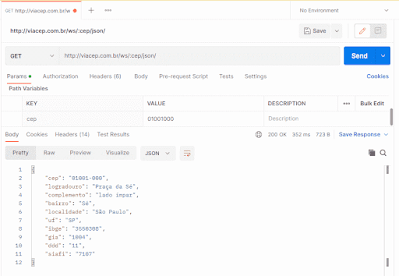
In this post we will see how to access a REST API with the Raspberry Pi Pico W, using the SDK C/C++ and MicroPython. An example of a call to a RESP API, using Postman Basically, a REST API is uses an HTTP method (like GET and POST) to access and manipulate "resources".

Mini Review: Banana Pi BPI-PicoW-S3, an ESP32-S3 Board with the Pico Form Factor

Image
Banana Pi is known for its alternatives to Raspberry Pi SBCs (single board computers). Now they have launched a board with the same pinout and form factor as the Pi Pico, but with an ESP32-S3 microcontroller. Let's take a look at it.

Raspberry Pi Debug Probe and C/C++ SDK & Tools Easy Install on Windows

Image
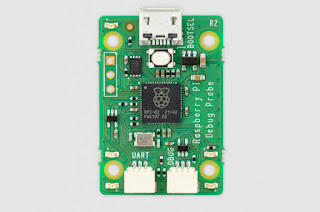
 In an unexpected move, the Raspberry Foundation  announced the Raspberry Pi Debug Probe , an interesting accessory for the Pico boards (and other boards with ARM microcontrollers). The Debug Probe board A few days later, they announced the Raspbery Pi Pico Windows Installer for easier installation of the SDK and the complete toolchain needed for developing C/C++ for the Picos under Windows.

Using WiFi in the Raspberry Pi Pico (Part 4)

We will now take a look at TCP communication. There are client and server examples at pico-examples, let's see if we can understand what is done.